

How to Set a Local Advertising Budget You Can Afford
I’d set a local advertising budget using cash left after bills and reserves – not a percentage of sales. If I had $500 left, that would be my ceiling for a 30-day test, including ad fees, design, and tools – not a requirement to spend it all.
Here’s how I’d keep that test within budget:
- Set a customer cost limit: Spend less to win a customer than their first sale brings in after materials and direct labor.
- Check capacity: Cap spending at the lower of available cash or open customer slots × my target acquisition cost.
- Start small: With $500, test one channel in my service area and set an end date.
- Track paying customers: Review qualified leads, customer costs, revenue, and job costs weekly. <u>Revenue alone isn’t profit.</u>
- Set stop rules: Pause weak tests, check tracking, and increase spending only after two months below my customer cost target.
My goal: learn what brings in customers without putting bills, cash reserves, or service quality at risk.
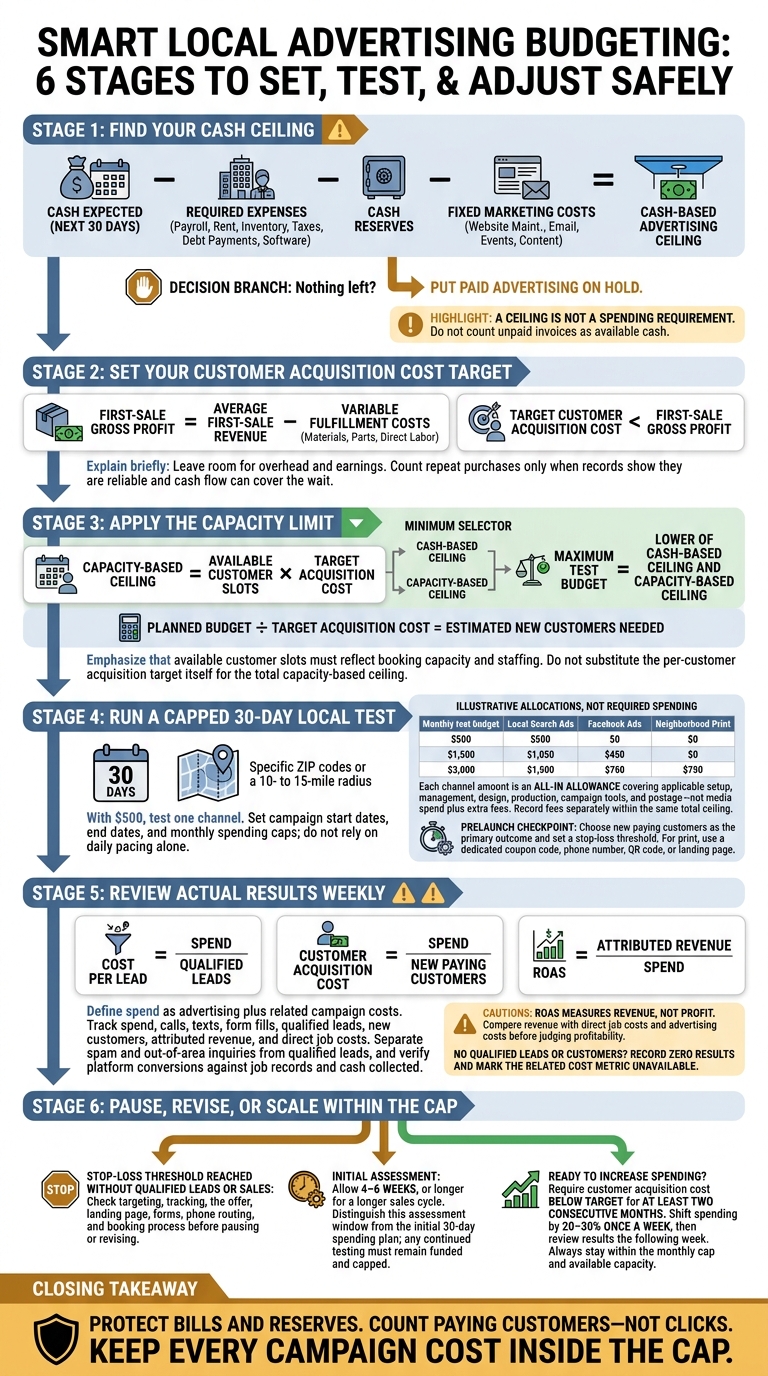
How to Set an Affordable Local Advertising Budget
1. Set Your Budget and Customer Acquisition Limit
Subtract Bills and Set Aside Cash Reserves
Start with cash you expect to collect in the next 30 days – not unpaid invoices. Subtract payroll, rent, inventory, taxes, debt payments, software, and other required expenses. Set aside your cash reserve, too. Then subtract fixed marketing costs outside advertising, such as website maintenance, email, events, and content.
What’s left is your advertising ceiling, not a spending requirement. If nothing remains, put paid advertising on hold. This ceiling sets the most you can spend testing ads in the next step.
Keep ad management, design, photography, and campaign tools within that ceiling. These costs leave less money for ad placements; they aren’t extra bills to add outside your budget.
Set a Cost Limit for Each New Customer
Turn that ceiling into a per-customer limit. Calculate first-sale gross profit = average first-sale revenue − variable fulfillment costs, including materials, parts, and direct labor.
Set your target cost per acquisition below that profit so each sale still contributes to overhead and earnings. Include both advertising costs and related campaign fees when measuring acquisition cost. Only count repeat purchases once your records show they’re reliable and your cash flow can cover the wait.
Check Your Customer Goal Against Demand and Capacity
Divide your monthly advertising budget by your target acquisition cost. This estimates how many new customers you need if you spend the full budget. Check your booking capacity and staffing before committing.
Your spending cap is the lower of your cash-based ceiling and your capacity-based ceiling. Calculate the capacity-based ceiling as available customer slots × target acquisition cost.
sbb-itb-303bd8e
Setting & Planning An Advertising Budget (How Much Will It Cost?)
2. Divide Your Budget for a 30-Day Local Test
Use the lower of your cash ceiling and customer acquisition limit to set your test budget. Then divide that amount across a 30-day test.
Sample Monthly Budgets: $500, $1,500, and $3,000
Pick channels based on how local customers search. Use local search to reach people ready to buy and Facebook for visual discovery. With a $500 budget, test just one channel.
| Monthly Test Budget | Local Search Ads | Facebook Ads | Neighborhood Print |
|---|---|---|---|
| $500 | $500 | $0 | $0 |
| $1,500 | $1,050 | $450 | $0 |
| $3,000 | $1,500 | $750 | $750 |
Treat each amount as an all-in allowance that covers setup, management, production, and postage. Record fees separately from ad spend.
Next, tie those dollars to a service area and an end date.
Set Your Service Area and Spending Caps
Target specific ZIP codes or a 10- to 15-mile radius around your business. Give each campaign a monthly cap, start date, and end date. Don’t rely on daily budget pacing alone. Track total spending across channels, including print commitments.
Create a Monthly Test Worksheet
Choose one primary outcome, such as new paying customers – not clicks. Add worksheet columns for dates, area, monthly cap, target customers, target acquisition cost, actual leads, actual customers, and revenue. Keep qualified leads separate from spam and out-of-area requests.
Before launch, set a stop-loss rule: pause the test if spending hits your threshold without bringing in qualified leads. Check targeting, tracking, and the offer before spending more. For print, track responses with a dedicated coupon code, phone number, QR code, or landing page.
After 30 days, use the worksheet to move spending only where the results support it.
3. Measure Results and Adjust Spending
Once your test is live, use the results to decide where each dollar goes next.
Calculate Lead Cost, Customer Acquisition Cost, and Ad Return
Update your worksheet weekly with each channel’s spend, calls, texts, form fills, qualified leads, new customers, attributed revenue, and direct job costs. Check platform-reported conversions against actual job records and cash collected – not just clicks or form submissions.
Calculate these three metrics:
- Cost per lead = spend ÷ qualified leads
- Customer acquisition cost = spend ÷ new paying customers
- Return on ad spend (ROAS) = attributed revenue ÷ spend
If you have no qualified leads or customers, record zero results and mark the related cost metric as unavailable. ROAS measures revenue, not profit. Compare attributed revenue with direct job costs and ad spend before calling a campaign profitable.
Use these numbers to decide what to keep, cut, or scale.
Pause Weak Tests and Shift Spending Gradually
Each week, compare spending with your remaining allowance, confirm that ads reach your service area, and test forms and phone routing. Check irrelevant search terms, missed calls, and the booking process before judging an offer. Allow 4–6 weeks for an initial assessment, or longer if your sales cycle takes more time.
Before increasing a campaign’s budget, make sure it brings in customers below your customer acquisition cost target for at least two consecutive months. If a test reaches its review threshold without qualified leads or sales, check tracking, the offer, and the landing page before pausing or revising it. Shift spending by 20–30% once a week, then review results the following week. Keep total spending within your monthly cap.
Conclusion: Keep Growth Within Your Budget
After the 30-day test, revisit your completed worksheet. Check that your budget still covers bills and cash reserves, and base your customer acquisition limit on gross profit after direct labor and materials.
Record your spending cap, review date, and service capacity. Let actual customer results – not clicks – guide spending. Fund only channels that stay below your acquisition limit and fit your capacity.
Keep ad spend, management fees, and technology costs in the same worksheet so you can see the full cost of local growth.
FAQs
How much cash should I reserve before buying ads?
Before buying ads, set aside enough cash for one or two months of planned ad spending, even if results take time. That spending shouldn’t put your finances under strain. Keep a separate testing fund so experiments don’t disrupt your day-to-day business.
Budget only for the leads your team can handle, and put a system in place to respond to every inquiry. Clicks that turn into unanswered calls are wasted ad dollars.
How should I budget for ads during slow seasons?
Map out your business’s busy and quiet periods. Then build budget scenarios for slower months, factoring in lower demand and fewer leads. Match spending to your capacity and market demand.
You can cut spending without stopping marketing altogether. Keeping it active can help build your online presence and preserve historical data. If seasonal patterns change unexpectedly, review your budget right away instead of leaving it as is.
How do I track customers who see multiple ads?
Tracking customers across multiple ads can be tough because most platforms track activity separately. To connect the dots, use retargeting campaigns to reach people who engaged with earlier ads, dedicated phone numbers to trace each inquiry to its channel, and landing pages with campaign-specific QR or promo codes to link actions to campaigns.
Bring these metrics together in one tracking sheet to follow conversion paths and assess your overall cost per customer.


