

How to Train Staff to Ask for Honest Customer Reviews
A 25-minute staff training should teach one clear habit: ask for honest reviews, then accept “no” without asking again. Use the same eligibility rule for every customer, follow each review site’s rules, and never steer customers toward a rating.
Divide the session into four parts:
- 5 minutes on rules: No rewards, ready-made reviews, or screening for happy customers.
- 5 minutes on wording: Practice a short, neutral invitation, explain the link or QR code, and give customers space.
- 10 minutes on role-play: Practice with satisfied, unhappy, uncertain, and rushed customers. Keep complaint support separate from review requests as part of your Reputation Management strategy.
- 5 minutes on readiness: Check that staff can make the request, share the link, and stop at a refusal.
After training, use a one-page checklist and private coaching. Track how staff ask – not review counts or star ratings.
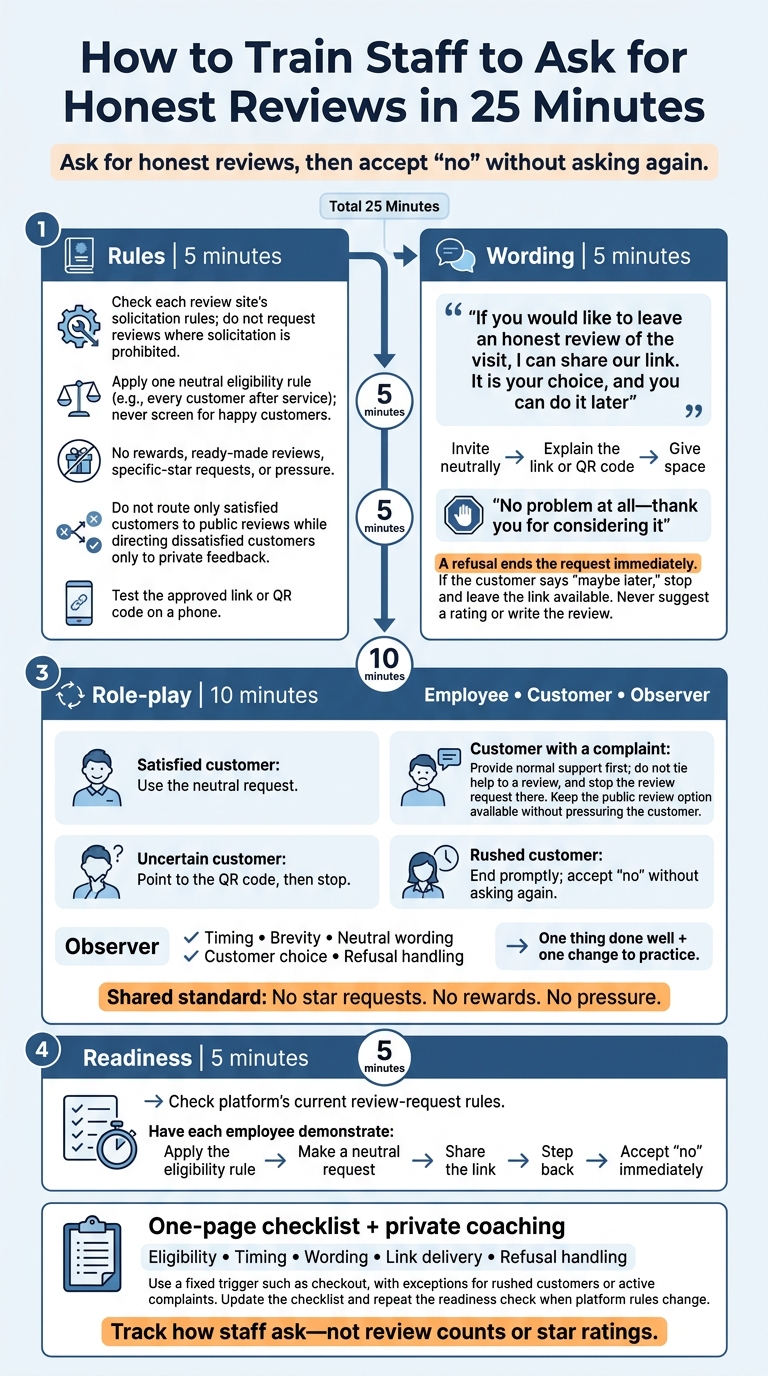
How to Train Staff to Ask for Honest Reviews in 25 Minutes
Step 1: Set Rules for Review Requests
Use one standard for every request: ask for honest feedback, not a specific rating. Check each review site’s solicitation policy, and don’t request reviews where solicitation is prohibited. Test the approved link or QR code on a phone before staff use it.
Train staff to ask every eligible customer, use the approved link, and avoid pressure. Then teach them the exact words to use.
Ask Customers Without Screening for Satisfaction
Choose one neutral eligibility rule, such as inviting every customer after a completed service. Ask because someone used the business – not because they seem happy or likely to leave a positive rating.
Do not use review gating: sending satisfied customers to a public review page while directing dissatisfied customers only to a private feedback form. Handle complaints separately, and keep the public review option available to customers who had problems. Skip the request only when a customer is visibly rushed, not because you expect criticism.
Ban Rating Pressure, Scripted Reviews, and Incentives
Let customers choose their rating and write in their own words. Ban requests for specific stars, keywords, or staff names. Staff must not provide ready-made review text or write reviews for customers. Do not offer discounts, gifts, or prize entries for reviews. Review incentives can violate federal rules and platform policies.
Remove review quotas, rating-based bonuses, and employee rankings tied to review scores. Coach staff on what they control: who to ask, how to ask, and how to accept a refusal.
sbb-itb-303bd8e
Step 2: Teach a Short, Neutral Request
Once the rules are set, teach staff exactly what to say to customers.
Choose the Right Time and Words
Have staff practice the script out loud in pairs. Ask at checkout or after the customer has used the product. Use the same invitation with every customer, no matter how satisfied they seem.
Use this exact wording as the baseline script:
“If you would like to leave an honest review of the visit, I can share our link. It is your choice, and you can do it later”
Share Instructions, Then Give Customers Space
The manager should show staff how to share the link or QR code, give brief navigation instructions, and step away. Stick to instructions: do not suggest a rating or write the review.
Accept No Without Asking Again
Teach staff to end the conversation politely when a customer declines. A refusal ends the request immediately.
“No problem at all – thank you for considering it”
Practice this line until it sounds natural. Then move on without asking why or repeating the request. If a customer says “maybe later,” stop there and leave the link available. Handle complaints separately, and never tie fixes to reviews.
Step 3: Role-Play Requests and Refusals
Set a 10-minute timer and use the same neutral script from Step 2 in every round. Divide staff into groups of three: employee, customer, and observer. Rotate roles so everyone practices making requests and handling refusals. Let each attempt finish before offering feedback. Coach a natural tone, not memorized wording.
Practice 4 Customer Scenarios
Practice these four hypothetical situations:
- Satisfied customer: Use the neutral request.
- Customer with a complaint: Provide normal support first. Don’t tie help to a review, and stop the review request there.
- Uncertain customer: Point to the QR code, then stop.
- Rushed customer: End promptly. If the customer says no, accept it without asking again.
If the uncertain customer asks whether they have to review now, use this response, then give them space:
“No, you can take the link with you. Leaving a review is your choice”
Check Each Request and Give Feedback
Score every round against the same standards: no star requests, no rewards, no pressure. Have the observer check timing, brevity, neutral wording, customer choice, and how the employee handles a refusal. Watch for repeated requests or wording that invites only satisfied customers to leave a review.
Begin feedback with one thing the employee did well, then name one change to practice. Replace language that steers customers toward a star rating with:
“Would you consider sharing your honest experience?”
Conclusion: Check Staff Readiness and Follow Up
Use the final 5 minutes after practice to check the platform’s current review-request rules and confirm that staff are ready. Have each employee complete the process once: apply one eligibility rule, make a neutral request, share the link, step back, and accept “no” right away.
Share a one-page Checklist and Coach Privately
Put eligibility, timing, wording, link delivery, and refusal handling on a single one-page checklist. If someone misses a step, use it to correct the mistake before the next shift. Choose one fixed trigger, such as checkout, and note exceptions for rushed customers or active complaints.
Watch interactions periodically, then coach privately on gating, pressure, incentives, or telling customers what to write. Track the process, not the rating, and avoid review quotas. When the rules change, update the checklist and repeat the readiness check.
Get Help With Marketing Setup
For help with review-request materials and follow-up workflows, Small Business Marketing and Technology Services can build branded landing pages and QR codes.
FAQs
How can I prevent automated reminders after a customer declines?
Train staff to record a customer’s decision to decline a review request immediately in your customer relationship management (CRM) system. Update your review management software in real time to reflect that choice.
Small Business Marketing and Technology Services recommends connecting your feedback tools to your CRM. That way, logging a decline automatically excludes the customer from future automated review requests by email or text.
What should staff do if a customer asks which rating to choose?
Staff should stay neutral and never suggest a rating. Encourage customers to share honest, independent feedback based on their own experience. The goal is to hear their perspective – not steer them toward a specific score.
Honest feedback protects the integrity of your reviews. Small Business Marketing and Technology Services stresses that this is key to building trust with local customers.
How can I check staff compliance without review quotas?
Focus on quality and consistency, not review volume. Spot-check customer feedback platforms regularly to assess whether staff routinely invite customers to leave reviews. Use praise and coaching to help staff make asking for honest feedback part of good service – and accept every refusal without pressure.


