
Local Marketing: 7 Low-Cost Ideas for Small Businesses
I’d start local marketing with a free Google Business Profile and one clear way for customers to contact you. Before paying for ads, check your hours, phone number, and service area everywhere customers find you.
Here are the seven low-cost ideas I’d focus on:
- Update your Google Business Profile so nearby customers can find your details.
- Ask for honest reviews without offering rewards.
- Keep Facebook and your website current, with working contact links.
- Fix directory listings that show wrong or outdated information.
- Partner with nearby businesses that serve similar customers.
- Share offers in local groups only where their rules allow.
- Offer a customer referral credit after a qualifying paid purchase – not for a review.
My approach: start with three channels, not all seven. Set a spending limit, track calls and sales, and review results after 30 days. <u>Judge each channel by the customers it brings in – not just views or likes.</u>
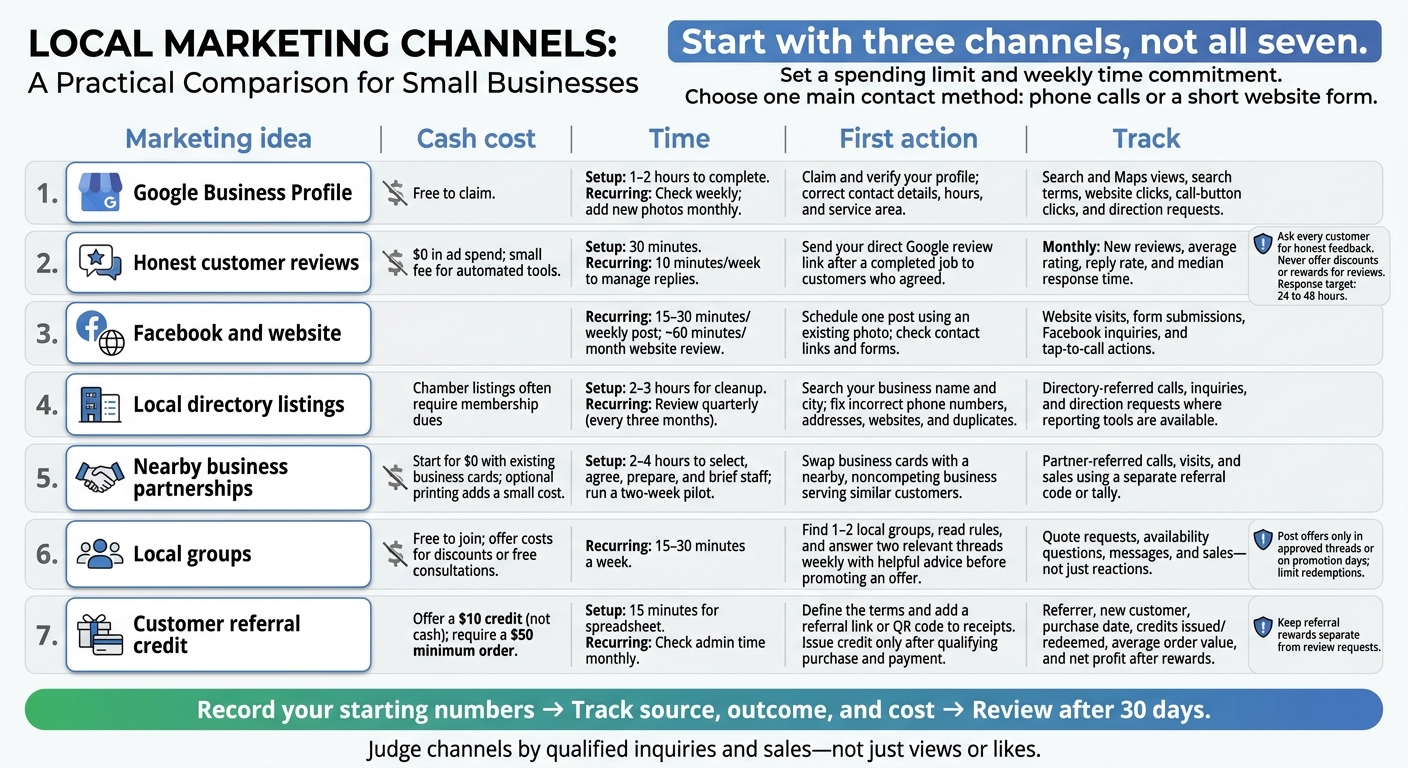
7 Low-Cost Local Marketing Ideas Compared
6 Proven Low-Cost Marketing Strategies That Actually Work (No Ad Budget Needed)
sbb-itb-303bd8e
Plan Your Local Marketing
Define your service area before spending time or money. List the ZIP codes or neighborhoods you serve, or set a service radius you can reliably cover.
Pick one main contact method you can check regularly: phone calls or a short website form. Tell customers when to expect a reply, and promise only what you can deliver. Keep one approved version of your business name, address, phone number, description, and hours.
Set a monthly spending limit and a weekly time commitment. Count every recurring cost – not just ads. Start with three channels you can maintain instead of trying every option, and reserve a weekly block of time to work on them.
Before making changes, record your starting numbers: calls, website inquiries, and Google Business Profile views or direction requests, which can signal local interest. Ask new customers how they heard about your business when they book or check out. Track the date, source, outcome, and cost in a simple spreadsheet. Each month, compare sources against actual inquiries and purchases so you can focus on what brings in customers.
With your budget, contact method, and starting numbers in place, begin with your Google Business Profile.
1. Update Your Google Business Profile
Cash Cost and Time
Google Business Profile is free to claim and takes about 1–2 hours to complete. Check it weekly for incorrect details, new reviews, and posts that need updates.
Affordable First Action
Find your business on Google Search or Maps, select “Own this business?”, and follow the verification steps. Pick a primary category that matches your core business. Add two to four secondary categories only for services you provide. Upload clear photos you already have of your exterior, interior, or team.
Help Customers Find and Contact You
Think of your profile as your main local listing. It should tell customers who you are, where you serve, and how to contact you. If customers don’t visit your location, hide your address and list your service areas instead.
Keep your phone number, website, services, and regular and holiday hours up to date so customers can reach you quickly.
Google uses distance, relevance, and prominence to determine local visibility. Share one useful update each week and add new photos monthly.
Results to Track
Use your profile’s Performance report to check Search and Maps views, search terms, website clicks, call-button clicks, and direction requests. Add tracking tags to your website link so you can see visits from your profile in Google Analytics 4.
Once your profile details are accurate, start building trust through customer reviews.
2. Ask for Honest Customer Reviews
Once your Google Business Profile is set up, use it to ask recent customers for reviews.
Cash Cost and Time
Asking for reviews costs $0 in ad spend. Allow about 30 minutes to set up the process and 10 minutes each week to manage replies. Automated email or text tools may charge a small fee.
Affordable First Action
Add your direct Google review link to thank-you emails or texts for customers who have agreed to receive them. Send your request after a completed job, pickup, or appointment.
Ask every customer for honest feedback. Never offer discounts or rewards in exchange for reviews.
Use Reviews to Build Trust
Reviews help nearby customers decide whether to contact you. Use your Google Business Profile to reply to both positive and negative reviews within 24 to 48 hours.
Thank customers for specific feedback. When someone shares a complaint, offer a brief apology and move the conversation to phone or email.
Results to Track
Each month, track new reviews, average rating, reply rate, and median response time. These reviews can also help customers trust the other places they find your business online.
3. Keep Your Facebook Page and Website Current
After customers check your reviews, they should be able to visit Facebook or your website to learn more and contact you.
Use Facebook for quick local updates and your website for service details and contact information. Link each post to a relevant service or location page.
Keep both channels up to date so people arriving from local search find useful information.
Cash Cost and Time
Set aside 15–30 minutes for one weekly post and about 60 minutes each month to review your website.
Affordable First Action
Schedule one post this week using a photo you already have: your team, your storefront, or work a customer has approved you to share. Alternate weekly between recent jobs and community highlights.
Help Customers Find and Contact You
Keep your phone number, hours, and service area details consistent across Facebook and your website. Make your phone number tappable on mobile, and put a clear booking or quote button near the top of your website. During your monthly website review, check that links and forms work.
Once your posts and pages are current, track which ones lead to calls and form submissions.
Results to Track
Add tracking tags to links from Facebook to your website so you can identify that traffic in analytics. Monitor website visits, form submissions, Facebook inquiries, and tap-to-call actions to see what brings in inquiries.
4. Correct Your Local Directory Listings
Start with your Chamber of Commerce, trade association, and municipal listings, focusing on those customers are most likely to see first. Wrong hours, phone numbers, or addresses can send people to the wrong place and hurt your local visibility.
Cash Cost and Time
Chamber listings often require membership dues. Set aside 2–3 hours for the first cleanup, then review your listings quarterly.
Affordable First Action
Search Google for your business name and city. Check the first page for errors or duplicate listings, and request fixes through each directory’s portal or contact form.
Use the same business details on Google, Facebook, and your website. Fix errors that prevent customers from reaching you first: a wrong phone number, address, or website.
Help Customers Find and Contact You
Create a quarterly audit sheet with each listing’s name, URL, login reference, business details, and last review date. Store passwords in a password manager – not in the sheet.
Copy business details from your master file. Every three months, check for holiday-hour changes and duplicate listings.
Results to Track
Track directory-referred calls, inquiries, and direction requests through each listing’s reporting tools, where available. Review those results before renewing a paid listing.
Once your listings are accurate, look for nearby businesses that can refer customers to you – and that you can refer customers to in return.
5. Partner With Nearby Businesses
Cash Cost and Time
Start for $0 with existing business cards and shared posts. Set aside 2–4 hours to pick a partner, agree on an offer, prepare posts, and walk staff through the referral process. Co-branded flyers or QR code cards add a small printing cost.
Affordable First Action
Look for a nearby business that serves the same customers but doesn’t compete with you. Choose one with a similar service standard and reputation. The goal: help local customers find, call, or visit both businesses.
Begin with a business-card swap and a two-week pilot. Before promoting the offer, agree on the audience, the offer itself, start and end dates, and who will handle inquiries.
Help Customers Find and Contact You
Every joint offer should include both businesses’ addresses, hours, and ordering links or phone numbers. Make the next step easy for customers.
Results to Track
Assign each partner a separate referral code, or keep a simple tally of partner-referred calls, visits, and sales. After two weeks, compare the results before deciding whether to extend the arrangement.
If the pilot works, share the same offer in local groups that allow business posts.
6. Share Offers Where Local Group Rules Allow
Local groups can put your offer in front of nearby customers at almost no cost.
Cash Cost and Time
Local community groups and forums are free to join. Plan to spend about 15–30 minutes a week participating. If you offer a discount or free consultation, limit redemptions to keep costs under control.
Affordable First Action
Find 1–2 local groups and read their rules. Post offers ONLY in approved threads or on promotion days. Before sharing an offer, answer two relevant threads each week with helpful advice – not a sales pitch. This puts useful advice before promotion.
Help Customers Find and Contact You
Label your post “Local Offer.” Add your business name and one contact method, such as a booking link or phone number. Make the terms and redemption limit clear. Skip exaggerated claims, repeat posts, and unsolicited pitches.
Results to Track
Track which groups bring in quote requests, availability questions, messages, and sales – not just reactions. Ask customers how they heard about you. Before posting again, compare those results with the time you spent and the cost of your offer.
7. Offer a Customer Referral Reward
Give satisfied customers a reason to send new local customers your way – without spending much on leads.
Set Up Your Referral Reward
Offer a $10 credit, not cash. Create a free tracking spreadsheet in about 15 minutes. Issue the credit only after the referred first-time customer makes a qualifying purchase and completes payment.
Set a $50 minimum order so the reward doesn’t eat up your margin.
Help Customers Find and Contact You
Make referrals easy to share and redeem by adding a referral link or QR code to receipts.
Spell out the terms on checkout pages and receipts: who qualifies, minimum spend, payout timing, stacking rules, expiration, and restrictions. Keep referral rewards separate from review requests.
Results to Track
Record the referrer, new customer, purchase date, credits issued, credits redeemed, average order value, and net profit after rewards.
Check admin time each month. If running the program takes more work than the sales justify, simplify it.
Build a Monthly Local Marketing Routine
Once your main local channels are in place, keep them current with a simple monthly routine. Start with a local audit: check that your business details are correct and contact links work. Review one channel at a time to see what drives calls and visits.
Set a weekly calendar reminder to check profiles for incorrect edits, respond to new reviews, and answer Facebook messages. Review calls, direction requests, and website clicks, too. Once a month, update photos and check upcoming holiday hours.
Make review requests part of every completed job. After each purchase or appointment, email or text the customer a direct review link. Never offer payment or rewards for reviews.
Each quarter, compare which channels drove inquiries and sales. Check directory listings for errors and duplicates. Track calls, website inquiries, partner referrals, and referral sales separately. Use UTM-tagged links or channel-specific offer codes to help identify where those contacts and sales came from.
Conclusion: Make Your Business Easy to Find and Contact
Keep your Google Business Profile, directory listings, website, and Facebook page current so customers can find accurate details faster and contact you without extra steps. Honest reviews build trust. Partnerships and community posts can also bring in more local inquiries.
Make these simple tasks part of your monthly routine. This week, make one no-cost update and test one outreach idea: add a click-to-call button and ask a nearby business about a cross-promotion.
After 30 days, keep only the channels that bring qualified inquiries or visits that lead to sales.
Make it easy for nearby customers to find you, trust you, and contact you.
FAQs
Which three local marketing channels should I start with?
Start with your Google Business Profile. Fill out all your business information, add photos, share updates, and respond to reviews. Make a habit of asking happy customers for honest reviews – and replying to them – to help turn more visitors into customers and improve your visibility in local searches.
Use email marketing to keep in touch with past customers. Short, well-timed offers or reminders can encourage them to visit again or reach out.
What should I change if local inquiries aren’t becoming sales?
Help customers feel confident about your business and ready to book:
- Complete your Google Business Profile and include a booking link.
- Ask customers for honest reviews, and respond to their feedback.
- Give customers a reason to book with clear offers or incentives you can track.
- Make sure you have enough staff and inventory to meet the demand your marketing brings in.
How do I set a referral reward that stays profitable?
Keep rewards simple and affordable without cutting into your margins. Offer service credits, percentage-based discounts, or free add-ons instead of cash, which can get expensive fast.
Give both the referrer and the new customer a reward. That makes asking for a referral easier. Track redemptions in your point-of-sale system or a spreadsheet so total reward costs stay within your target customer acquisition budget.


