

Local SEO Checklist: 9 Basics for Small Businesses
I start local SEO with three checks: correct business details, useful local pages, and working contact options. Before adding content, I fix anything that stops customers from calling, submitting a form, or booking.
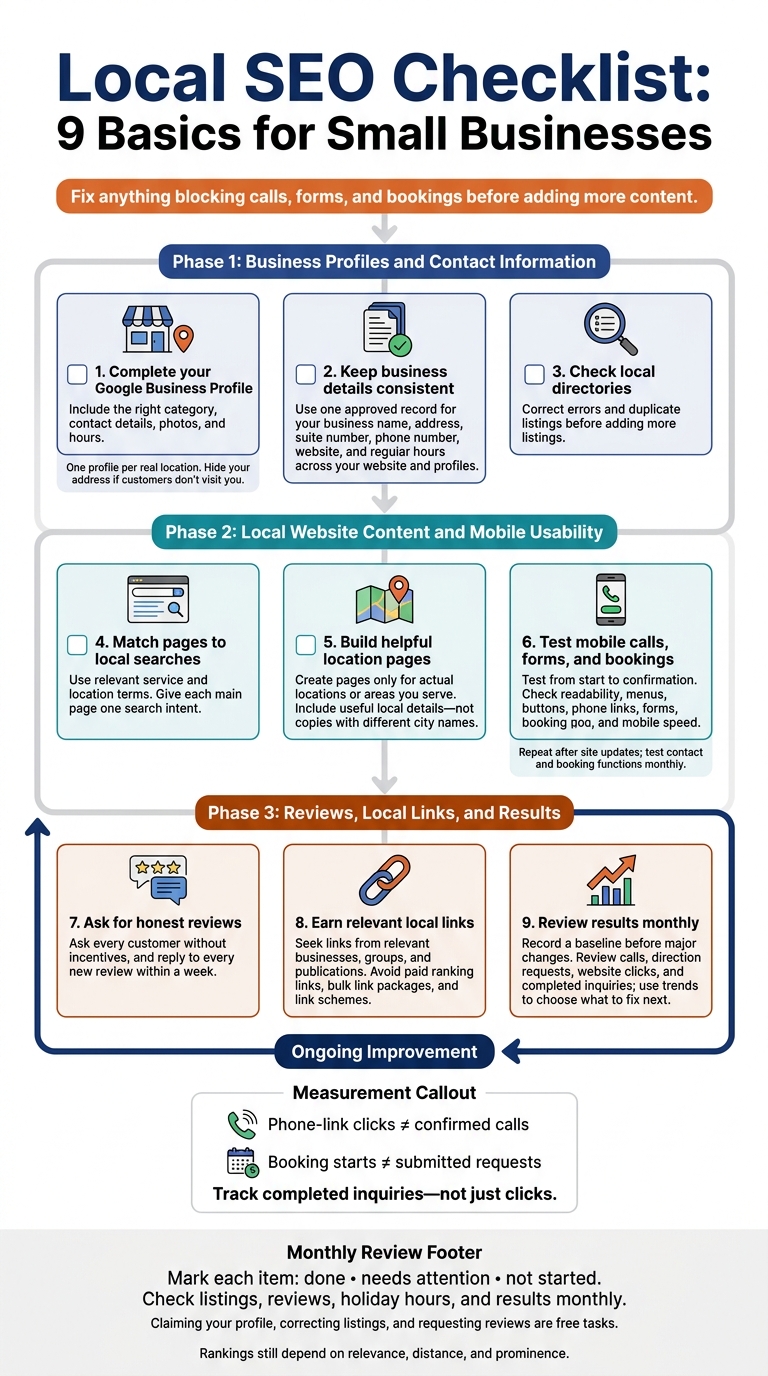
Here’s my nine-step checklist:
- Complete your Google Business Profile with the right category, contact details, photos, and hours.
- Keep business details consistent across your website and profiles.
- Check local directories for errors and duplicate listings.
- Match pages to local searches using service and location terms that fit your business.
- Build helpful location pages for places you serve – not copies with different city names.
- Test mobile calls, forms, and bookings from start to confirmation.
- Ask customers for honest reviews without incentives, and reply to feedback.
- Earn local links from relevant businesses, groups, and publications.
- Review results monthly, including calls, direction requests, and completed inquiries.
Claiming your profile, correcting listings, and requesting reviews are free tasks. I track <u>completed inquiries – not just clicks</u>, because visibility matters most when customers can reach you. These steps can help, but rankings still depend on relevance, distance, and prominence.
Local SEO Checklist: 9 Basics for Small Businesses
Local SEO Audit Checklist: Your Path to Ranking #1 (Free Template)
sbb-itb-303bd8e
Business Profiles and Contact Information
Keep one approved business record with your official business name, physical address, suite number, local phone number, website, and regular hours. Use it for every listing update so your details stay consistent.
1. Claim and Complete Your Google Business Profile
Claim your listing in Google Maps or at business.google.com, complete Google’s verification process, and keep one profile per real location. Select the primary category that best fits your business. Then add relevant secondary categories, services, a description, and current photos. Include your website, phone number, regular hours, and holiday hours.
If customers visit your storefront, use that address. If you travel to customers and don’t serve them at your address, hide your address and set service areas by city or ZIP code. Never use a P.O. Box as a business location.
2. Keep Your Business Details Consistent
Use the same name, address, suite number, phone number, and hours on your website, Google Business Profile, social profiles, and directories. Minor formatting differences matter less than outdated contact details.
Put contact information in readable website text – not just an image. Check it after every move, phone number change, or schedule change.
3. Update and Track Local Directory Listings
Review existing listings before adding more. Focus on local directories, chambers of commerce, industry associations, and major data sources. Use your approved business details, and avoid creating duplicate listings. To fix duplicates, request corrections from site owners or use their merge or removal tools.
Track each directory in a worksheet with these fields: platform name, profile URL, name/address/phone accuracy, duplicate risk, access status, correction needed, and last review date.
Local Website Content and Mobile Usability
Once your business details are consistent, match your website content to the local searches customers use.
4. Match Website Pages to Local Searches
Use the words nearby customers search for. Pair your service with your city, neighborhood, or service area, and look to “People also ask” for customer wording. Add terms like “emergency,” “affordable,” “open late,” or “24-hour” only if they describe your offer. Give each main page one search intent: service pages explain what you do; location pages explain where you do it.
Include your service and location in the title, main heading, URL slug, and opening copy. Don’t repeat keywords needlessly or create nearly identical pages that only swap city names.
5. Build Useful Location and Service-Area Pages
With your search terms set, build pages that help customers check your services, location, and availability. Create separate pages only for actual locations or areas you serve, and make it clear whether customers visit you or you travel to them.
Include available services, hours, service boundaries, and any delivery radius. For walk-in locations, add directions and parking details. Link to the most relevant service and booking pages. Each page should offer useful local details, not repeat another page.
Review these pages monthly and whenever business operations change. Update details and photos, and remove obsolete pages.
6. Test Mobile Calls, Forms, and Booking
Once your pages are in place, check how easily mobile visitors can call, submit a form, or book. Test service, location, and contact pages on common smartphones and tablets. Repeat these checks after every site update.
Make sure text is readable, menus work, buttons have enough space between them, and pages don’t require horizontal scrolling. Tap phone links, submit every form, and complete each booking request through confirmation. Test the whole process, so calls, forms, and bookings stay easy to use on mobile.
Check mobile speed, paying close attention to load time and layout shifts. Resize large images and lazy-load noncritical media.
Reviews, Local Links, and Results
7. Ask for and Respond to Honest Reviews
Once your site works well on mobile, focus on building trust and measuring results. Reviews from real customers help nearby searchers feel confident about choosing your business.
Send a short review request after checkout or service completion. Add your review link to follow-up emails or put a QR code on receipts. Ask every customer, not just happy ones. Never offer incentives, invent reviews, or screen out negative feedback.
Reply to every new review within a week. Thank customers personally for positive feedback. When someone shares a complaint, acknowledge the issue and explain the next step.
8. Earn Relevant Local Backlinks
Earn links from trusted local and industry sites that direct nearby customers to the right page. Start with people and groups you already know: chambers, suppliers, industry associations, and community partners.
You could write a supplier testimonial, contribute useful content, or pitch newsworthy updates to local reporters. Ask them to link to the page that best serves their readers – not automatically your homepage.
Check referring pages to make sure your business name and link placement are correct. Avoid paid ranking links, bulk link packages, and link schemes.
9. Track Results and Review Monthly Trends
Record a baseline before making major changes so you have a clear point of comparison. Track how customers find your Google Business Profile in Search and Maps, along with calls, direction requests, and website clicks.
In Google Analytics 4, track visits to key location and service-area pages, form fills, and appointment requests. Keep phone-link clicks separate from confirmed calls, and booking starts separate from submitted requests. A click or started booking isn’t the same as a completed inquiry.
Each month, compare calls, direction requests, website clicks, and bookings. Use Google Search Console to check search impressions, clicks, and indexing issues. Check a few priority searches in an incognito window to spot visibility changes, keeping in mind that results can still vary by location.
Find the weakest step in the customer’s path from discovery to inquiry, then use those monthly trends to choose what to fix next.
Conclusion: Keep Your Local SEO Checklist Current
Review your checklist as one system, not a set of separate tasks. Mark each item as done, needs attention, or not started.
Fix anything blocking calls, forms, and bookings before adding more content. Test contact and booking functions monthly. Track results each month to see which fixes improved visibility and inquiries.
Set a monthly reminder to check your listings, reviews, holiday hours, and results – including calls, visits, and bookings.
For help with local marketing and your website, contact Small Business Marketing and Technology Services through its website.
FAQs
How long does local SEO take to work?
Most local businesses start seeing changes in search rankings within a few weeks to a few months. The timing depends on your market and how much competition you face for your target keywords.
Local SEO takes time – it’s not a quick fix. Steady effort matters more than speed because results usually build over time.
Which local SEO tasks should I prioritize on a tight budget?
Claim your free Google Business Profile and complete every part of it to help your business appear in local search and map results. Keep your business name, address, and phone number (NAP) consistent across your website and online directories so search engines can trust your business details.
Ask customers for reviews, and respond professionally to help build your reputation. Use location-specific keywords naturally on your homepage and service pages so nearby customers can find you.
Do I need a location page for every city I serve?
No, but dedicated location pages can help you appear in local organic search results. If you have multiple physical locations, create a separate, optimized page for each. Include location-specific details to help customers find their nearest branch.
For cities where you don’t have an office, service-area landing pages can help you rank in organic search results – as long as each page has original content tailored to that area.


