

11 Post-Service Review Request Templates: Texts and Emails
My rule for review requests: name the completed work, link directly to the review form, and ask for honest feedback – not a specific rating. Give customers time to judge the results, and make leaving a review optional.
I’ve included 11 templates you can personalize:
- Texts: Repairs, home cleaning, auto repairs, salon or barber appointments, moving services, and one optional reminder.
- Emails: Installations, landscaping, dental appointments, professional consultations, and photography delivery.
For short service calls, I suggest waiting 24–48 hours; installations and other work may need longer. Add the customer’s name, your business name, and a brief service detail – but leave out private medical or client information.
Before sending, I check consent, opt-outs, and platform rules. My approach is simple: use the same eligibility rules for every completed job, offer no incentives, and send <u>no more than one reminder</u>, 3–7 days later.
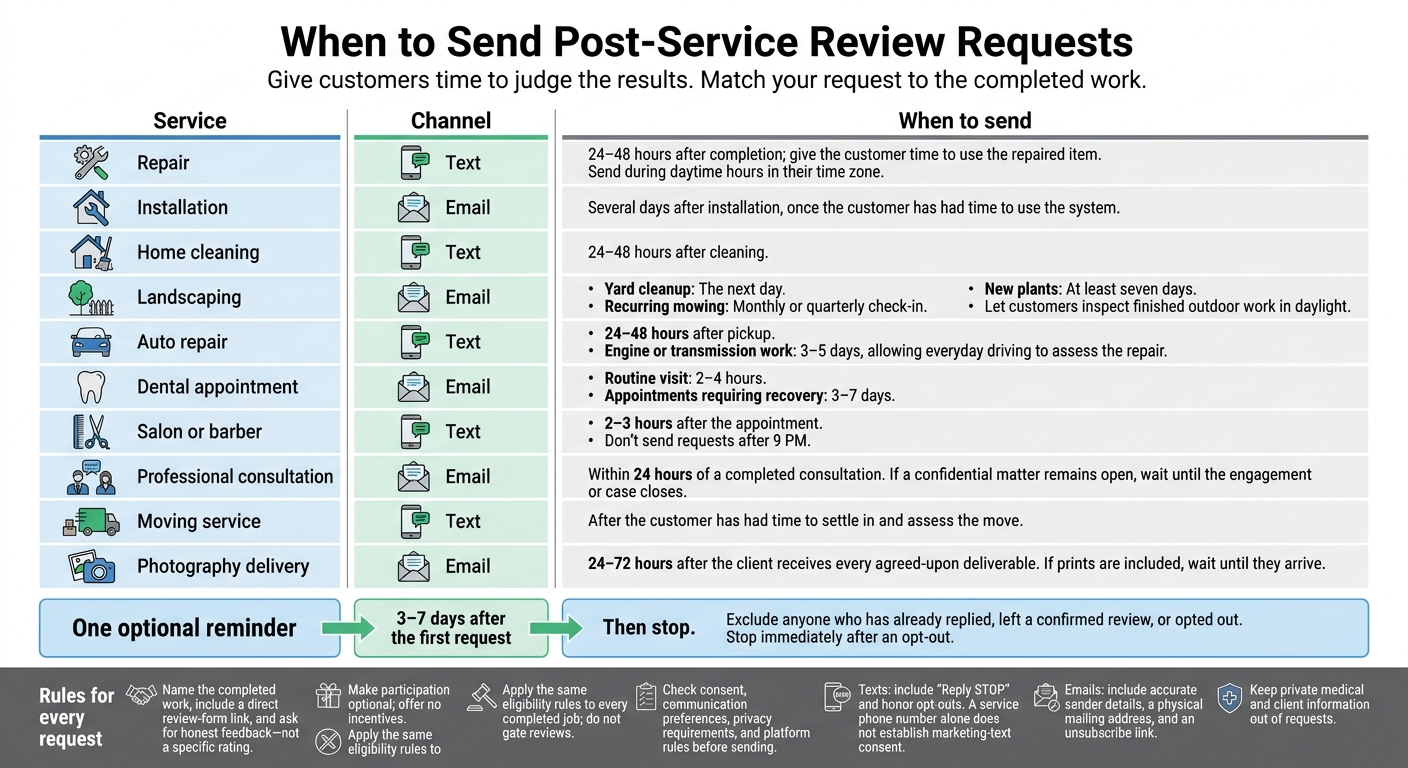
When to Send Post-Service Review Requests
How to Ask for Client Testimonials (Scripts Included!)
sbb-itb-303bd8e
Before You Send: Personalization, Timing, and Review Rules
Fill in each bracketed field with the customer’s first name, your business name, the completed service, and a U.S. date, such as November 3, 2026.
Use your Google Business Profile review link to take customers straight to the review form.
Match the timing to the work. Send requests 24–48 hours after short service calls, several days after installations, or after agreed-upon project deliverables arrive. Customers need time to judge the results. If needed, send one optional reminder 3–7 days later, then stop.
Check text-consent rules before sending. A phone number provided for service does not mean the customer has agreed to marketing texts. Include “Reply STOP” in texts and honor every opt-out.
For emails, include accurate sender details, a physical mailing address, and an unsubscribe link.
Apply the same eligibility rule to every completed job. Don’t gate reviews or send unhappy customers only to private feedback. Check the review platform’s rules for requesting reviews.
1. Text: After a Repair
Keep your message focused on the repair you completed.
Personalize the Repair Detail
Use the customer’s first name and name the exact repair you completed.
Send After 24–48 Hours
Give the customer 24–48 hours to use the repaired item. Then send your text during daytime hours in their time zone.
Keep the Text Short and Optional
Hi [First Name], thanks for choosing [Business Name] for your [completed repair]. If you’d like, leave an honest review: [direct review link].
2. Email: After an Installation
Customers usually need a few days to use an installed system before they can review it accurately.
Include the Installation Details
Use the job record to name the installed system and state the completion date.
Wait Several Days
Send the email several days after installation so the customer has time to use the system.
Keep the Request Voluntary
Make it clear that leaving a review is optional. Use a clear subject line and put the direct review link on its own line.
Subject: How is your installation working?
Hi [First Name],
[Business Name] completed your [system] installation on [Month Day, Year]. If you’d like, please share an honest review of your experience.[direct review link]
Thank you,
[Business Name]
3. Text: After a Home Cleaning
Once the cleaning is done and the results are visible, send a brief review request.
Personalize the Cleaning Details
Include the customer’s first name, your business name, the cleaning type, and the service date.
Send Within 24–48 Hours
Send the request within 24–48 hours of the cleaning, while the visit is still on the customer’s mind.
Keep the Text Short and Optional
Keep your message brief, and let the customer decide whether to leave a review.
Hi [First Name], thanks for choosing [Business Name] for your [cleaning type] on [Month Day, Year]. If you’d like, share an honest review: [direct review link].
4. Email: After Landscaping Service
Ask for a landscaping review after the customer has seen the finished work in daylight.
Name the Completed Work
Name the service you completed, such as a yard cleanup or planting project. Include the service date and the lead technician’s name so the customer knows which visit you mean.
Match Timing to the Job
Give customers time to look over outdoor work before asking for a review. For yard cleanups, send the email the next day. For recurring mowing, use a monthly or quarterly check-in. For new plants, wait at least seven days.
Keep the Email Short and Voluntary
Keep the subject line short, make the review optional, and put the direct review link on its own line so it’s easy to find.
Subject: How did your [service name] go?
Hi [First Name],
Thanks for choosing [Business Name] for your [service name] on [Month Day, Year]. If you’d like, please share an honest review of your experience:
[direct review link]
Thank you,
[Sender Name], [Business Name]
5. Text: After an Auto Repair
Ask for a review after the customer has driven the vehicle long enough to judge how the repair holds up.
Personalize the Repair Details
Mention the repair and vehicle so the customer knows exactly which visit you’re asking about.
Wait Until They’ve Driven
Text the customer 24–48 hours after pickup. For engine or transmission work, wait 3–5 days so they have time to test the repair during everyday driving.
Keep the Text Short and Optional
Keep the message under 160 characters, including names and the link. Make it clear that leaving a review is optional.
Hi [First Name], thanks for choosing [Shop Name] for your brake replacement. If you have a moment, please leave an honest review here: [direct review link]
6. Email: After a Dental Appointment
Personalize Without Clinical Details
Use the patient’s first name and practice name, but refer only to the visit. Leave out procedures, diagnoses, and medical history.
Choose a Sending Time
Send the email 2–4 hours after a routine visit. For appointments that require recovery time, wait 3–7 days.
Keep the Email Brief
Replace the bracketed fields below. Put the direct review link on its own line so it’s easy to find.
Subject: Thank you for visiting [Practice Name]
Hi [First Name], thank you for your recent appointment at [Practice Name]. If you’d like, please leave an honest review of your experience.
[direct review link]
Thank you,
[Practice Name]
Check Privacy and Preferences
Dental review requests call for stricter privacy checks than other service follow-ups.
Before sending, check the patient’s email consent and communication preferences. Review applicable patient-privacy and CAN-SPAM requirements, too. Never confirm that a reviewer is a patient in a public reply.
7. Text: After a Salon or Barber Appointment
Keep beauty appointment review requests brief, and wait until the client has had time to judge the result.
Personalize the Service
Include the client’s first name, your salon or barbershop name, and the exact service they received.
Send After They Get Home
Text 2–3 hours after the appointment so the client has time to see the result. Don’t send requests after 9 PM.
Keep the Text Short
Aim for under 160 characters, including the link.
Hi [First Name], thanks for choosing [Business Name] for your [Service]. If you’d like, share an honest review: [direct review link]
Make It Optional
Let clients decide whether to leave a review. Send the same neutral invitation to all eligible clients.
8. Email: After a Professional Consultation
Personalize Without Sharing Details
Keep the wording general to protect the client’s privacy. Use their first name and your business name, but describe the service only as a meeting or consultation.
Send Within 24 Hours
Send the email within 24 hours of a completed consultation, while the experience is still top of mind. If the consultation is part of a confidential matter that’s still open, wait until the engagement or case closes.
Keep the Email Brief
Use a sender name the client will recognize and a short subject line. Put the direct review link on its own line so it’s easy to find.
Subject: Thank you for meeting with us
Hi [First Name],
Thank you for your consultation with [Business Name]. If you’d like, please leave an honest review of your consultation experience.
[direct review link]
Take care,
[Consultant Name], [Business Name]
Keep It Private
Leave out case numbers, diagnoses, balances, and private addresses. Before requesting public reviews for legal, medical, or accounting consultations, check the privacy rules that apply.
9. Text: After a Moving Service
Give the customer time to settle in and assess the move before asking for a quick, honest review. Include their first name, your moving company’s name, the move type, and the date the move was completed. Keep the text to one short block, with the direct review link near the end.
Hi [First Name], thanks for choosing [Business Name] for your [Move Type] move on [Move Date]. If you’d like, please leave an honest review: [direct review link]
10. Email: After Photography Delivery
Ask for a review only after the client has received the final photos and any prints.
Personalize the Details
Include the client’s first name, your photography business name, and the name of the final gallery or delivered work. Be specific instead of saying “your photos,” and mention the gallery, prints, or other deliverables.
Send After Delivery
Send the request 24–72 hours after the client receives every agreed-upon deliverable. If the order includes prints, wait until they arrive.
Keep the Email Short and Optional
Keep the subject line short and place the direct review link on its own line. Don’t offer discounts or pressure the client to leave a review.
Subject: How was your photography experience?
Hi [First Name], thanks for choosing [Business Name] for [Final Gallery or Delivered Project Name]. Now that your [Final Gallery/Prints/Deliverables] have been delivered, would you share an honest review of your experience? It’s optional.
[direct review link]
Thank you,
[Photographer Name]
11. Text: One Optional Review Reminder
Use this optional reminder as your final outreach to customers who haven’t responded to the first review request.
Personalize the Reminder
Mention the completed service so the customer knows which job you’re referring to.
Send One Reminder, Then Stop
Send the reminder 3–7 days after the first request. Check your records first and leave out anyone who has already replied.
Keep the Text Short and Voluntary
Keep it to one short message, make the review optional, and don’t offer incentives. After this follow-up, stop contacting the customer about the review.
Hi [First Name], a quick reminder from [Business Name] about your [Completed Service]. If you’d like to share honest feedback, here’s our review link: [direct review link]. Thanks!
Set Up Consistent Post-Service Follow-Up
Once you’ve chosen a template, build a repeatable follow-up process around it. Match the process to your team’s time and budget so it’s easy to maintain. Use the same workflow for every completed job to keep requests consistent.
Before sending, check how your system handles completion triggers and templates. Test direct review links, and make sure reminders exclude people who’ve opted out or already left a confirmed review. Follow the service-completion timing and one-reminder limit established above to keep requests timely and easy to track.
Conclusion: Keep Review Requests Honest and Optional
Pick the template that fits the completed service. Add the customer’s name, your business name, a short service detail, and a direct review link. Send the request soon after the work is done.
Ask for honest feedback – not a specific rating. Follow reputation management best practices, and don’t offer incentives. Make participation optional, send no more than one reminder, and stop immediately if the customer opts out.
FAQs
Should I request a review if a complaint is unresolved?
No. Wait until you’ve addressed the customer’s concerns and they’re satisfied again. Asking for a review while they’re frustrated or feel ignored makes a negative review more likely. Resolve any remaining issues before reaching out to improve your chances of receiving positive, constructive feedback.
How can I track reviews without pressuring customers?
Focus on an automated system that’s easy to manage, rather than constant manual checks. Small Business Marketing and Technology Services recommends setting clear goals to keep your outreach consistent over time without overwhelming customers.
If tracking feels difficult, an agency can offer a professional second opinion and help you set up a system that’s simple to use.
Should I use text or email for review requests?
Plain-text email works well for review requests. It can feel more personal and direct than heavily designed marketing emails, which may make customers more likely to respond. Keep your request short, professional, and focused on the service you provided so clients can easily leave honest feedback.


